DocAtlas: Growing My Doc-Driven Development Workflow
@superlucky84|October 29, 2026 (5h ago)23 views

DocAtlas: Growing My Doc-Driven Development Workflow
Back in February, I wrote about Doc-Driven Development With AI. I was switching between agents and sessions and wanted to spend less time explaining the same context. My approach was to keep requirements, design decisions, and implementation plans in Markdown, then use those documents to resume work.
I've continued using this approach at work and on personal projects. The basic idea hasn't changed: the project's context should survive the conversation.
But writing good documents at the beginning turned out to be only part of the job. Implementation changes them. More features scatter them across the repository. Old plans sometimes remain where they can be mistaken for current guidance. Keeping those documents reliable became as important as deciding what the next agent should read.
I collected the refined workflow, agent roles, and a viewer for people to browse the documents in a repository called DocAtlas. This post is about how the personal workflow from my earlier article grew into that repository.
Why I put the emphasis on document management
Writing requirements and designs before implementation overlaps heavily with existing spec-driven and documentation-first approaches. Recording decision rationale and handoff notes are familiar practices too. I've adapted these habits to working with AI agents and made them repeatable in my own projects.
I use the name Doc-Driven Development because the emphasis I want is on the documents and their ongoing management.
An accurate description of what to build matters. I also want to preserve why a decision was made, how far implementation has progressed, what was verified, and what remains undecided. Those documents should continue to serve as the project's memory after a feature ships.
The question I keep coming back to is:
Could another agent read these documents and continue the project?
Spec-driven development can cover these concerns too. The name expresses where I place the emphasis. I describe this perspective in the repository's method document.
Start with four documents, then adapt to the project
I'm also trying this workflow at work, in a project where legacy and newer code coexist and the directory tree has become fairly untidy. That raised different questions from starting a new project with a few documents. Before adding more files to an already complicated structure, I had to think about where they should live.
The concern grows with monorepos, complicated scaffolding, or projects with a vast number of features. Imagining every feature's requirements, design, and implementation plan collected in one place felt like a potential documentation explosion. The documents were supposed to make context easier to find; searching through a mountain of them could become another burden.
I found a useful hint in how we place test files. Practices vary, but tests often live right beside the module they test. You can find them while reading the code, and their location helps explain what they cover. I thought documentation could be just as easy to follow if it lived near the code it described.
But the right size for a documentation group needed a separate decision. Code is usually organized by purpose, feature, or responsibility, with related functions and modules kept together. Keeping things that need to be understood and changed together close to each other supports cohesion and helps define boundaries for modularity and abstraction. I wanted document locations to follow those groupings already expressed in the code.
I settled on placing a documentation section at a suitable location for a group of related modules. A docs/ directory beside every individual module would be too granular. If understanding orders or payments requires several modules, that group needs a place for documentation that explains it as a whole.
Choosing these boundaries is an area where I think people should help the agent. Someone familiar with the project can explain which pieces form a feature and which belong in the same context, then choose document locations with the agent. In a project with legacy code, directory names alone may not reveal those relationships.
The basic documents and their maintenance rules
Document locations are flexible, while the four document roles from the earlier post remain the same.
| Document | What it preserves |
|---|---|
REQUIREMENTS.md | What to build, with scope and constraints |
DESIGN.md | How to build it, and what was decided and why |
IMPLEMENT.md | The implementation phases and current progress |
MANUAL_TEST_CHECKLIST.md | The behavior a person should verify |
When a contract becomes shared across groups, it moves to a common parent location with links from the relevant documents. A separate specification can become something like CONTRACTS.md, while keeping one canonical source for the contract.
For example, if checkout and catalog each represent a feature area containing related modules, the structure might look like this:
repo/
  docs/payments/CONTRACTS.md
  services/checkout/docs/
    REQUIREMENTS.md
    DESIGN.md
    IMPLEMENT.md
    MANUAL_TEST_CHECKLIST.md
  web/catalog/docs/
    REQUIREMENTS.md
    DESIGN.md
Every small change doesn't need all four documents. Small fixes can proceed without them. If a feature already has documentation, read and update the relevant source. Adopting the workflow in an existing project doesn't require converting every document at once.
The documents we do keep have rules. Unresolved decisions stay visibly TBD. Decisions include a rationale, and progress includes test evidence. One current handoff block in IMPLEMENT.md records what is done, what comes next, blockers, and the latest commit. Git preserves earlier states.
This is what managing documents like code means to me: make the current source clear, update documentation in the same change when behavior or contracts change, and use version control for history. Merging, moving, and cleaning up documents become part of development too.
I delegate this maintenance and cleanup to agents as well. That called for roles covering document updates during implementation and checks against the actual changes, extending the process beyond drafting.
Designer, implementer, and reviewer
The earlier article focused mainly on the designer who turns a conversation into documentation. DocAtlas collects skills and rules for three roles, adding an implementer and a reviewer.
| Role | Responsibility |
|---|---|
| Designer | Turn conversations into requirements, design, phased plans, and verification documents |
| Implementer | Implement a phase, record test evidence, synchronize documents, and update the handoff |
| Reviewer | Review changes read-only against the documents, project rules, and stated intent |
The key is giving the implementer responsibility for keeping the documents current alongside writing code. At the end of a phase, the next session should be able to tell what was implemented, what was verified, and what to do next.
The reviewer reports findings and severity without editing files. I wanted a separate role for comparing the result against the documented intent.
These roles are documented as Markdown skills and rules for agents to follow. The files are in the agent kit.
Leading the documentation flow and keeping the bigger picture
Alongside defining the agents' roles, we need to consider which judgments people should continue to make. Taking part in deciding where documents belong and how they guide the work also helps me understand the project again. It makes me think about which modules form each feature, what they share, and where the boundaries lie.
I think delegating work to agents and only checking results can make it easy to lose track of the project as features accumulate. A person may know which tasks are complete yet find it increasingly difficult to explain why the structure evolved this way or how a change affects other areas. That's why I believe people should lead the decisions about how documents are grouped, which sources guide the work, and how that context carries forward. Staying involved in those decisions helps avoid handing everything over to agents and losing our own understanding of the project along the way.
As agents take on implementation details and document updates, I want people to use that room to see the whole project from an architect's perspective: the relationships between features, boundaries of responsibility, shared contracts, and the direction of future changes. Leading the flow of documentation is one way to maintain that perspective. Even as agents work quickly, I want to stay aware of the overall direction and retain the broader view needed to judge the health of the structure.
People need a document map
To play that role, people need a way to see where the project's documents live and how they connect. Keeping documents near code makes them easier to find while changing a feature. As features multiply, though, seeing the whole project's documentation gets harder.
Agents can search and read files, but I still wanted to understand the overall structure: which features have documents, where old plans remain, and whether similar content is scattered across several locations.
Existing projects also carry legacy context. A document alone may not tell us whether a feature is still used or whether its assumptions are outdated. A person who knows that background can give the agent a useful hint.
After browsing the documents, I might want to say:
These look like the old and new plans for the same feature. Compare them against the implementation and consolidate the current source.
Orders now use this contract as well as payments. Move it to shared documentation and update the references.
We no longer use this feature. Check its code and documents and tell me what cleanup would involve.
I built the DocAtlas viewer to see enough of the project to make those judgments.
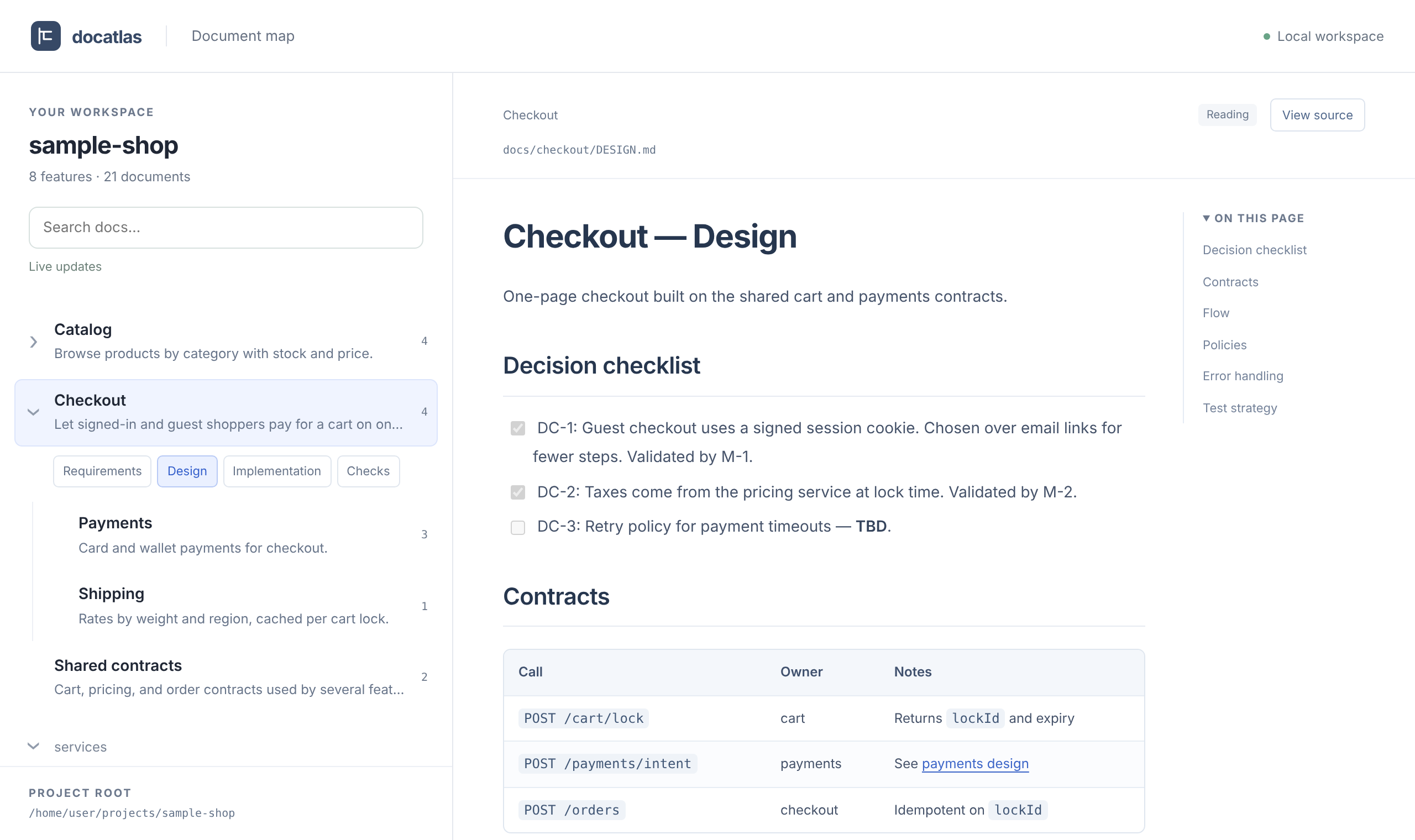
This screenshot shows the fictional shop included in the repository. The left side presents features and their document hierarchy; the right side renders the selected Markdown document. Click the image to view it at full size.
You can search document text and paths, then locate a result in the map. File changes appear in the viewer. Existing features don't need a complete four-document set, and discovery can include additional folders or all Markdown in the project. The document map guide and configuration guide explain the details.
The viewer doesn't edit documents or decide what is obsolete. It helps people understand where documents are and what they contain, then decide what to ask an agent to inspect or organize.
I want enough awareness of features, document locations, and old context to point the agent toward what needs attention, without personally maintaining every sentence.
Trying it
With Node.js 22 or later and npm, run the viewer from the root of the project you want to explore:
cd /path/to/project
npx docatlas
It starts a local server in the terminal and opens the document map in your browser. The target project needs no build or added dependency. It can be a non-JavaScript project with Markdown documentation too.
By default, discovery includes Markdown under docs/ directories and documents with the four standard names elsewhere in the project. To include other locations, use these options. Exclusions and .gitignore rules still apply.
npx docatlas --docs-dir documentation
npx docatlas --all-md
To try the agent roles, preview the files that would be installed, then install them:
npx docatlas agents install --dry-run
npx docatlas agents install
After installation, ask your agent to use doc-driven-designer-v1 to organize requirements, doc-driven-implementer-v1 to implement a phase, or doc-driven-reviewer-v1 to review changes. Installation options are in the agent kit guide.
You can use the method alone or just the viewer. The repository includes an example document set and the planning documents used to develop DocAtlas itself, if you'd like to see what actually goes into these files.
Still evolving through use
I started this to repeat myself less when switching agents. Continued use shifted my attention toward maintaining the documents over time. That led to more explicit roles, clearer writing and cleanup rules, and a tool for people to see the whole collection.
Maintaining this would have been difficult if I had to write and organize everything myself. Now I can ask AI to write and maintain the documents it primarily reads. With that burden reduced, I want to spend more of my own attention on the project's structure and direction, making decisions, and supplying hints about legacy context.
DocAtlas is the current result of that effort. I hope it also offers a useful follow-up for anyone wondering how the workflow in my earlier post developed through actual use.