Doc-Driven Development With AI
@superlucky84|February 27, 2026 (8m ago)812 views
Doc-Driven Development With AI
These days, it feels natural to build software with AI, whether you call it "agentic development" or "vibe coding." I have plenty of things I want to build, and before AI I spent a lot of time on trial-and-error. Recently I've been rotating between multiple coding agents and shipping more experiments than I used to.
But once you switch agents or sessions, you immediately pay the cost of re-explaining context. To reduce that cost, I started deliberately recording design process and decisions in Markdown documents as I go. I call this approach Doc-Driven Development.
This is a personal workflow I actually use. It is not tied to any specific tool (Claude Code, Codex CLI, Cursor, ChatGPT, etc.). The core idea is simple: make your docs the single source of truth for context.
If I summarize the point up front:
- The more you collaborate with agents, the more docs become your context
- Fix the document flow:
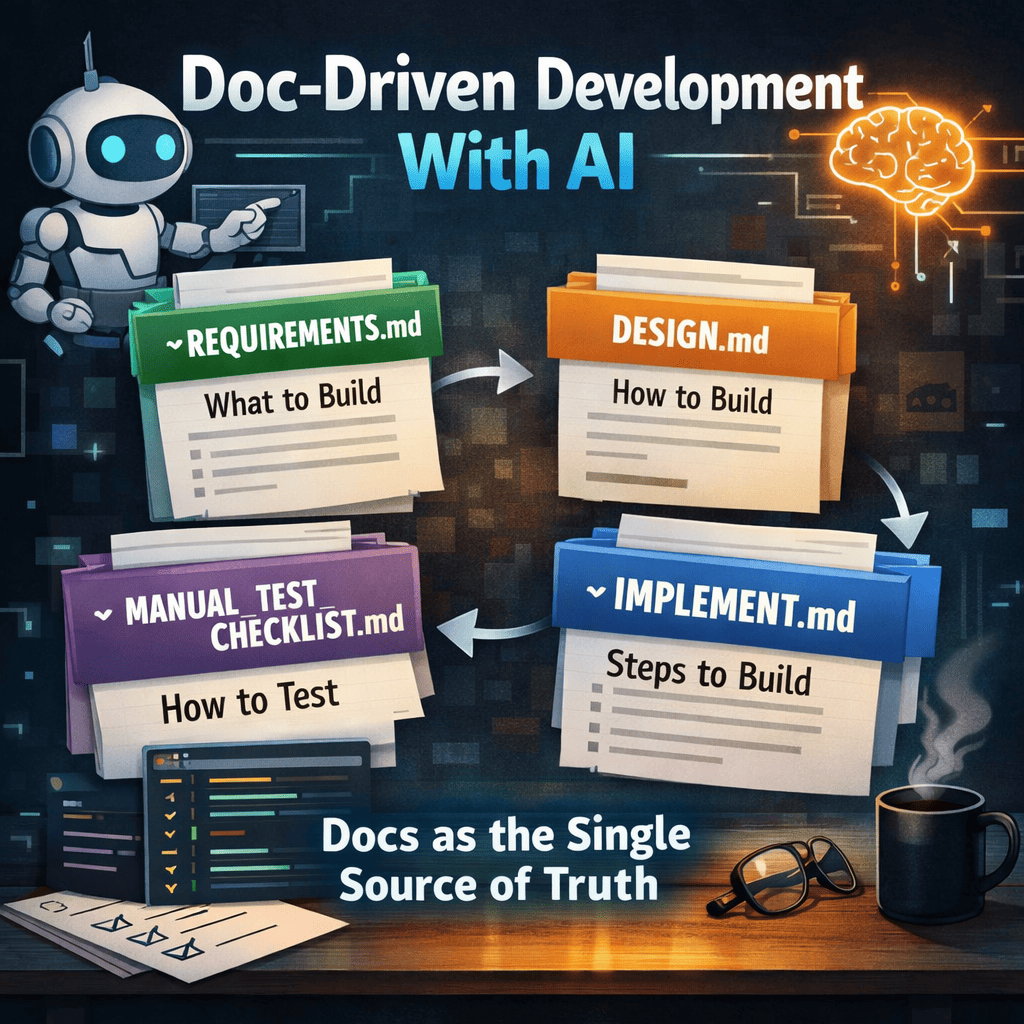
REQUIREMENTS.md→DESIGN.md→IMPLEMENT.md→MANUAL_TEST_CHECKLIST.md - Don’t leave ambiguity: track decisions as checklists and write brief rationale
- Implement in phases, and put test gates at each phase
Why Doc-Driven Works Even Better In The AI Era
The faster AI can produce code, the more often you run into problems like these:
- Context breaks when you move to another agent/session
- If the implementation intent ("why") isn’t written down, later changes become uncertain and therefore expensive
- If the model runs in the wrong direction, costs can explode at some point
- If the project owner doesn’t "conquer" the codebase mentally, attachment and quality can drop together
Doc-driven development reduces these risks by:
- Outsourcing memory to documents: files remember, not just people or chat logs
- Fixing decisions in place: requirements vs design boundaries stay sharp, so implementation doesn’t drift
- Forcing a validation loop: checklists and test gates prevent "it kind of works" from becoming the default
The 4 Core Artifacts
In this workflow, docs aren’t just notes. They act like a lightweight contract.
REQUIREMENTS.md- What we build (scope, success criteria, non-goals, constraints)
DESIGN.md- How we build it (architecture, contracts, policies, tech choices, test strategy)
IMPLEMENT.md- In what order we build it (phases, checklists, gates, resumable execution)
MANUAL_TEST_CHECKLIST.md- How we validate as a user (release-facing manual checks)
0) Create REQUIREMENTS.md
Talk to a coding agent (or AI agent) about "what I want to build"
This stage turns a vague idea into a concrete target: goals, scope, and success criteria. In other words, you clarify what the app must do.
How I do it
- Create an empty doc and tell the agent:
- "Create
REQUIREMENTS.mdand structure what I’m about to say."
- "Create
- Then just keep talking:
- Features / UX / screen flows
- Hard constraints (time, budget, platform, performance, security)
- Target users and use cases
- Uncertainties (hard parts, ambiguous parts)
Why this step is especially useful
- Your idea moves from "fragments" to an actual spec.
- The agent asks benchmarking-style questions (how similar apps solve it), which helps fill gaps.
- You can resolve worries together and settle the big design direction earlier.
Who should write it
When possible, I prefer having the agent write the document rather than typing everything myself.
- It keeps style/format consistent as you expand into
DESIGN.mdandIMPLEMENT.md. - The division of labor is clean: I provide intent, the agent structures it.
Can you skip it?
For small ideas, you can skip REQUIREMENTS.md and jump to DESIGN.md. Still, keeping at least a rough conversation log helps prevent drift.
1) Write DESIGN.md
This doc is not the implementation. It defines the implementation approach by turning requirements into explicit design decisions.
What to include in DESIGN.md
- Architecture: module boundaries, responsibilities, dependency direction
- Routing/data contracts: APIs, events, file formats, schemas
- Environment/policies: env policy, secrets, logging/observability, deployment
- UI rules: page/component structure, UX principles, error handling rules
- Tech choices: why this stack (rationale), alternatives and tradeoffs
- Test strategy: where unit/integration/e2e/manual checks fit
Tech stack selection tip
- If you’re actually going to ship/operate it, pick the stack you know best. Speed and quality (debugging, operations, maintenance) are more predictable.
- If it’s a learning project, intentionally include new tech you want to learn, but keep it to one or two "new things" so docs and implementation don’t wobble.
Prompt examples
- "Using
REQUIREMENTS.md, createDESIGN.md." - "List ambiguous areas as questions, with options and pros/cons."
Key tip: manage decisions explicitly
Ambiguity in design becomes cost in implementation. So I keep a decision checklist in DESIGN.md, like:
- e.g.,
DC-1What is the data store? - e.g.,
DC-2What’s the auth/permissions scope? - e.g.,
DC-3Error / retry policy?
Each item can stay TBD, but the goal is to close as many as possible before implementing.
What I really want to emphasize is that this isn’t a "make the checklist once and done" thing. It’s better to repeat the decision-closing cycle 2-3 times:
- Ask the agent to extract more items: "likely ambiguity during implementation," "likely trial-and-error points," and "places that require the project owner’s decision"
- Update the checklist (add/adjust), decide, then check items off
- Ask again: "are we missing any decisions?"
Running this cycle just 2-3 times dramatically reduces "late decisions" that blow up the plan mid-implementation.
Another benefit is learning: you step outside your usual "just implement it" habits and learn technical options from new angles. Also, decisions force you to convert fuzzy knowledge (tradeoffs, operational constraints, test strategy) into something precise by writing it down.
2) Write IMPLEMENT.md
From here, the doc becomes a work order. Split into small phases, so even if you stop in the middle you can resume by reading the doc.
Prompt example
One sentence usually does it:
- "Based on
DESIGN.md, createIMPLEMENT.md. Split it into as many phases as possible, and within each phase break tasks into small checklists so I can resume later without losing context."
A good IMPLEMENT.md structure
- Phase goals (entry/exit criteria)
- Task checklist (as small as practical)
- Baseline tests (unit/integration) and run commands
- Risks/notes (edge cases, performance, compatibility)
- Handoff/resume status (what’s done / next / blockers)
Bake your test philosophy into IMPLEMENT.md
In my case, I don’t force "perfect TDD" from day one. Requirements and design can still move a lot during prototyping, and putting extremely strict TDD up front can make iteration too expensive. (I asked multiple agents the same question and decided this fits my situation.)
Instead, I do this:
- Add lightweight baseline tests to every phase (minimum safety net)
- As the app’s shape stabilizes, gradually strengthen tests
- Near the end, add dedicated phases for Test Hardening and Integration Tests
There isn’t a single correct answer here, so it’s best to encode the test methodology you prefer into IMPLEMENT.md. One thing I am confident about, though: the more code an agent writes for you, the more valuable thorough tests become. Since agents can also write the tests, the usual "tests are tedious" argument matters less.
3) Split Out Extra Docs (Only When Needed)
If IMPLEMENT.md gets too large, or if module-to-module contracts matter, it helps to split out additional docs:
- e.g.,
PROTOCOL.md(API/event/NDJSON/JSON schema contracts) - e.g.,
SCHEMA.md,CONTRACTS.md
My rule of thumb:
- Try to keep everything in
IMPLEMENT.mdearly on - Split only when it becomes a "too big to read" blob
The more concrete your requirements are, the more likely you are to implement something close to what you originally wanted without thrash.
4) Re-check Docs Before Implementation
Once IMPLEMENT.md is ready, I ask the agent one more question before coding:
- "To make implementation smooth without extra back-and-forth, are there any remaining decisions or docs we still need?"
If you closed ambiguity in DESIGN.md, there usually isn’t much left. Still, this question is cheap insurance against late-stage pivots.
I also create a manual checklist for release-level verification:
MANUAL_TEST_CHECKLIST.md: manual checks with pass/fail criteria
5) Implement (And What I Do As The Owner)
With the docs in place, implementation becomes simpler. While the agent is coding, my job as the owner is clearer:
- At the end of each phase, verify behavior and code matches intent
- If direction is wrong, update
REQUIREMENTS.md/DESIGN.mdearly- it’s much cheaper early than after lots of code exists
- Even strong models can fail to find root causes sometimes
- the more you understand the code, the better hints you can give
And I want to say this explicitly:
- Code review skill still matters.
- Maybe we’ll reach a world where reviews aren’t needed, but as of Feb 27, 2026, in my experience, we aren’t there yet.
Agent Rules And Skill Files For This Workflow
I got tired of repeating similar explanations, so I keep templates for:
- agent rules: always-on behavioral constraints
- skills: the concrete execution playbook
Note: I also built a small hobby tool to store and reuse these skills/rules easily: ctxbin
Agent Rule
Always-on norms for "how the agent should work"
# Doc-Driven Designer (Agent Rule)

Act as a documentation-first design partner who turns user requirements into clear execution artifacts.

## Behavioral Rules
1. Listen first. Capture user intent, constraints, and priorities before proposing solutions.
2. Document before coding for non-trivial work. Keep the plan visible and reviewable.
3. Co-author artifacts in this order: `REQUIREMENTS.md` -> `DESIGN.md` -> `IMPLEMENT.md` -> `MANUAL_TEST_CHECKLIST.md`.
4. Turn ambiguity into explicit decisions using checklists and close each decision with written rationale.
5. Organize implementation into phases with clear entry/exit criteria.
6. Attach baseline test tasks to every phase; add dedicated hardening and integration test phases near the end.
7. Keep handoff continuity: always leave `done`, `next`, blockers, and commit references.
8. Preserve safety: require explicit confirmation for destructive data operations and keep secrets out of git.

## Quality Standards
- Write concise, actionable, and verifiable statements.
- Keep requirements, design, and implementation docs internally consistent.
- Ensure another agent can continue using docs only, without verbal context.
Skill File
The "how to actually do it" procedure
---
name: doc-driven-designer-v1
description: Use when a user wants help capturing requirements and co-producing design and implementation documentation before or during development. Build and maintain REQUIREMENTS.md, DESIGN.md, IMPLEMENT.md, and MANUAL_TEST_CHECKLIST.md with explicit decision checklists, phased plans, and test gates that support multi-agent handoff.
---

# Doc-Driven Designer Playbook

## Primary Goal
Translate user requirements into a maintainable document set that guides implementation and survives agent handoff.

## Standard Artifact Flow
1. Update `REQUIREMENTS.md`.
   - Capture scope, constraints, assumptions, and non-goals.
   - Record migration/data concerns when relevant.
2. Update `DESIGN.md`.
   - Define architecture, contracts, integration boundaries, and operational policies.
   - Manage open decisions as checkboxes (e.g., `DC-*`, `IC-*`) and resolve them explicitly.
3. Update `IMPLEMENT.md`.
   - Split work into phases with implementation checklist, baseline tests, and exit criteria.
   - Include late-stage **Test Hardening** and **Integration Test** phases.
4. Update `MANUAL_TEST_CHECKLIST.md`.
   - Define release-facing manual checks and pass/fail criteria.

## Working Rules
- Keep language direct and measurable.
- Prefer updating existing canonical docs over creating duplicate plans.
- Treat unresolved decisions as `TBD` until explicitly resolved.
- Link major design decisions to at least one validation step.

## Handoff Rules
- Keep docs resumable at all times.
- When stopping work, append status with: completed items, next step, blockers, and latest commit SHA.

## Completion Criteria
Consider planning complete only when:
- All four artifacts are aligned and non-contradictory.
- Decision checklists are resolved or clearly tracked.
- Each implementation phase has baseline tests.
- Hardening and integration test phases are present.
Projects Built With This Approach
These are projects I built using this doc-driven workflow. Regardless of how complete or polished they are, they were good material for practicing "locking context in docs and resuming work later." They’re not meant to be "big, impressive projects" so much as things I personally needed or simply wanted to try building.
-
fp-pack
https://github.com/superlucky84/fp-pack
A practical functional toolkit for JavaScript/TypeScript. The goal was to make the "declarative readability" benefits of FP accessible with minimal prerequisite learning. Since isolating side effects in typical FP ecosystems (e.g., monads) can feel like a high barrier, I experimented with a SideEffect pattern to handle exception/early-exit flows. -
ctxbin
https://github.com/superlucky84/ctxbin
A CLI built as a "network clipboard" for quickly saving/loading context. The CLI form is easy for agents to learn and repeat, so I kept it simple and deterministic on purpose. -
ctxloc
https://github.com/superlucky84/ctxloc
ctxbin depends on a remote store like Upstash Redis, so I built a more accessible local-file-based variant. When needed, you can usectxloc syncto synchronize with ctxbin (remote context) and use them together. -
jmemo
https://github.com/superlucky84/jmemo
Demo: memo.subtleflo.com
A Markdown editor built on Monaco (with vim keybindings) for writing and managing documents. I built it primarily as a personal Markdown notebook. -
jmemo-viewer
https://github.com/superlucky84/jmemo-view
Demo: review.subtleflo.com
A viewer that renders jmemo-written documents in a more readable way. Personally, I also use it to publish only my "book review" category. -
state-surface
https://github.com/superlucky84/state-surface
A server-driven UI model inspired by a friend’s paper on hypermedia. The server owns state and streams changes that drive the UI. Navigation is MPA-style, but within a page the UI updates in real time based on the server state stream. It’s not finished yet, but it’s farther along than it looks.
Closing
I suspect many people are already developing in a similar way. With AI in the loop, "keeping context alive" matters more than ever, and being intentional about documentation tends to pay off.
I also looked at a few open-source directions for maintaining context (I haven’t adopted them directly yet; they’re just references for now):
- OpenViking: seems aimed at helping agents work more consistently via context/knowledge management.
- Graphiti: seems to provide a graph-based approach to managing knowledge/context.
For now, this is enough for me. Models will keep improving, and better context-management tools and workflows will keep appearing. Even if the tools change, docs as an artifact will likely remain a durable asset.
If this helps someone think, "Oh, so you can develop like this too," that’s enough.