Breaking Free from JSX: Building My Own Template Parser
@superlucky84|November 24, 2026 (14h ago)66 views
I have a bit of an obsession. When I find a convenient tool, I use it happily, and then at some point I start worrying that I depend on it too much. Watching the heyday of jQuery, which seemed like it would last forever, come to an end, I thought the React trend might end someday too. What scared me was that if React or JSX disappeared, I might lose the convenient ways of working I had taken for granted along with them.
Even while building Lithent, a virtual DOM library, I left JSX transformation to the JSX option of an existing JavaScript parser. If someone suddenly told me tomorrow that I couldn't use JSX anymore, where would I even start? Looking back, it is a somewhat excessive worry. Still, I thought that if I understood the mental model of turning UI expressed as tags into function calls, and actually implemented it properly, I could rebuild it with my own hands whenever I needed to, without an existing JSX transformer.
So a while ago I built a small template parser prototype. While figuring out where to cut the string, I set up two positions, start and end. I left start where it was and moved only end, and when it hit the < or > I was looking for, I moved start up to end. The characters gathered before that point were passed along as one chunk. At the time I came up with this approach on my own and simply named the function search(). The search() from back then
I built a tree from the tags I read that way. When I met an opening tag I went down into a child, and when I met a closing tag I went back up to the parent. After cleaning up attributes and text, I walked the tree again and chained together h() calls. Looking at it again, the three steps I built back then correspond to parsing, tree transformation and code generation. I had implemented them by feel without knowing their names. The prototype from back then
After that, the wish to rebuild it properly stayed with me. Much later, I started getting a lot of help from AI at work. This time I decided to rebuild it while studying the structure of a parser, with AI as my teacher.
In my eyes, JSX was nearly perfect. The one thing I found lacking was how conditions and loops are written. When JavaScript expressions like ready && <Panel /> or items.map(...) are nested several layers deep between tags, the tag structure that makes up the screen is hard to take in at a glance.
I learned by watching senior developers keep templates and business logic strictly apart. Maybe that made me a little obsessive about the separation too. When other developers compared JSX with Vue templates and pointed out the same thing, I nodded along.
So I wanted my template syntax to have at least directives for conditions and loops. Like Vue's v-if and v-for, if you attach l-if and l-for, you can tell right from the opening tag under what condition an element is shown and which list it repeats over. To my mind, it was the minimum syntax I added so that the structure of the screen reads first. What I built that way is lithentTemplateParser, which turns Lithent templates into h() calls.
I still reach for regular expressions first when I deal with strings. Regular expressions alone are often enough. But if I know how parsers work, won't I have one more thing to try when a problem is awkward to solve with regular expressions?
From one line of template to a function call
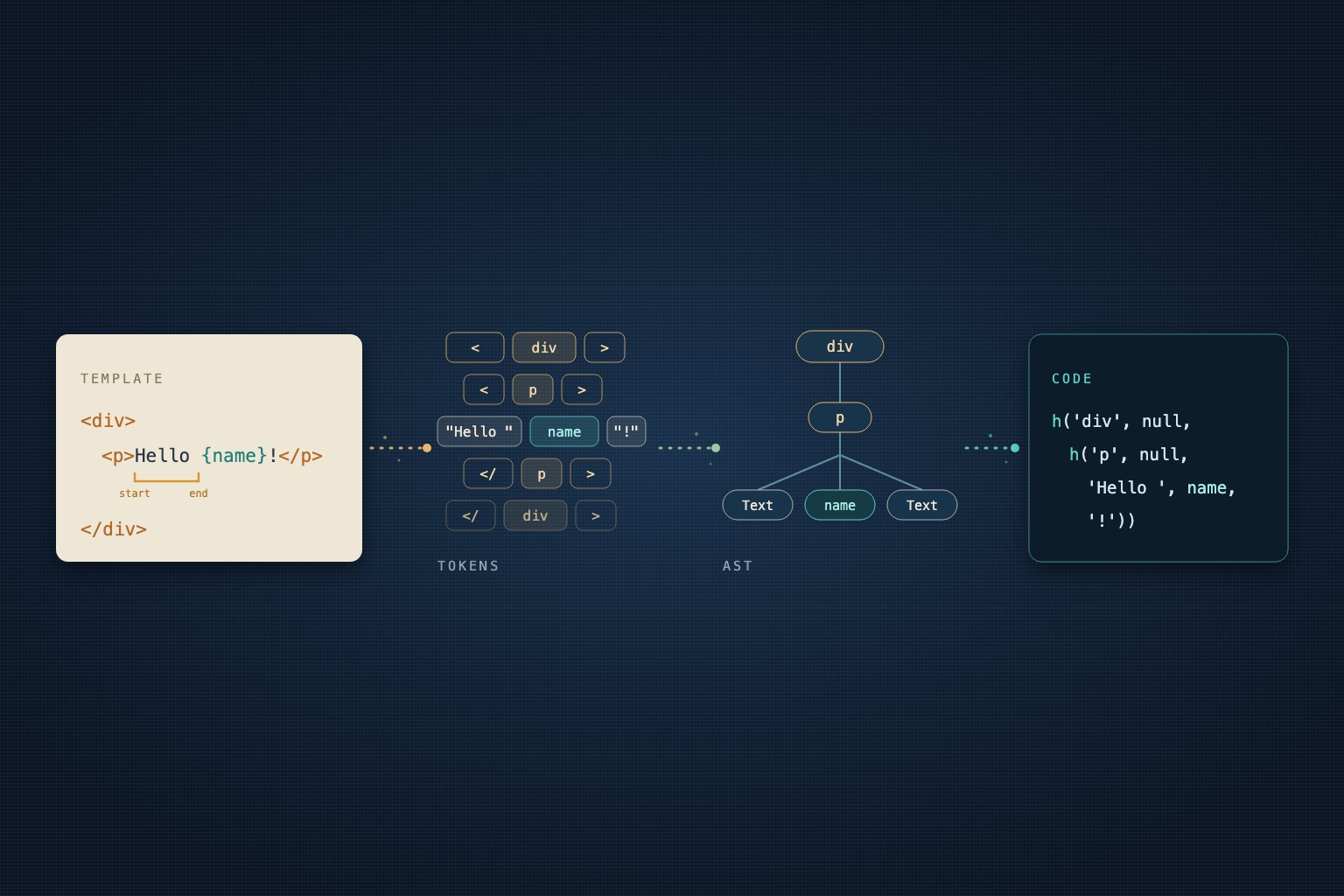
What a template compiler does is turn a string that describes UI into code that the browser's JavaScript engine can run. In Lithent, elements become h() function calls. In the example below, the result of the call that creates p is passed as a child argument to the outer div call. When the browser runs that code, h() creates virtual DOM nodes following this structure. Lithent's h()
<div><p>Hello {name}!</p></div>
<!-- generated code → h('div', null, h('p', null, 'Hello ', name, '!')) -->
First, it finds the boundaries between tags and body text in the string. Then it represents the relationship that p is inside div as a tree, refines the tree if needed, and writes it back out as JavaScript code. compile() handles this in four stages. compile() source
- The lexer reads the string from the front and turns pieces such as tag names or body text into tokens.
tokenize()is the function that starts this tokenizing work. - The parser, in
parse(), groups tokens according to the grammar and builds a tree (AST) that records which element is nested where. - The transformer, in
transform(), groups consecutive conditional branches and cleans up indentation whitespace, refining the tree into the shape code generation needs. - The code generator, in
generate(), walks the transformed tree and assembles theh()calls and their arguments into a JavaScript code string.
How the lexer groups characters into tokens
The lexer's job is easy to follow if you picture two pointers, start and end, that mark the beginning and end of a piece within the string. start is where reading of the current piece began. Everything before it has already been processed. end is the position being examined right now. Keeping start in place, you move end forward, and when you find the spot where the piece ends according to the grammar, you record everything from start up to just before end as one token. Then you move start to the first position of the next piece and repeat.
Suppose we split words by spaces and read "ab c de". At first, both start and end are 0. When end reaches the space at position 2, slice(0, 2) gives ab. After skipping the space, start moves to position 3, where c is, and reading starts again. The last word becomes a token at the end of the string.
start = 0, end = 2  →  "ab"
start = 3, end = 4  →  "c"
start = 5, end = 7  →  "de"
In the actual Lithent code, the cursor that moves is position. For example, readText() saves the position where it starts reading in start, and the position where it stops before < or { in end. Each token holds the range found this way, its content, and the kind of piece it is. In the opening example, < is recorded as a tag start, div as an identifier, and Hello as text. Lithent's readText()
The important thing here is the difference between looking and consuming. peek() looks at the character at the current position. peek(1) looks at input[position + 1], one step ahead of that spot. The 1 is only used to compute where to look, so the value of position stays the same. Looking at characters ahead without moving the cursor like this is called lookahead.
If the two characters checked this way are < and /, it enters the function that reads a closing tag. Inside, it calls advance() twice to consume the two characters. Consuming means reading the current character and actually moving position one step forward to the next character. Line and column information is updated at the same time. Lexer source
The same character is handled differently depending on where the lexer is currently reading. In body text, whitespace is recorded as a token too, but inside a tag it is only a separator between attributes, so it is simply skipped. Reading characters differently depending on context like this is commonly called a lexer mode. The Lithent lexer has no separate variable that holds a mode. When readToken() sees <, it enters readTagContent(), which reads the inside of a tag; when it sees {, it enters readExpression(); and everything else is read as body text by readText(). Which function it is currently in is, in effect, the mode. Branching in readToken() · readTagContent(), which reads inside a tag
When the lexer has read the opening example to the end, it produces the token array below. This array becomes the input to the next step, the parser. Real tokens also carry start and end positions (line, column and offset), but here I kept only type and value. The trailing space of Hello is part of the token value.
// tokenize('<div><p>Hello {name}!</p></div>')
[
  { type: 'TAG_OPEN_START',     value: '<' },
  { type: 'IDENTIFIER',         value: 'div' },
  { type: 'TAG_OPEN_END',       value: '>' },
  { type: 'TAG_OPEN_START',     value: '<' },
  { type: 'IDENTIFIER',         value: 'p' },
  { type: 'TAG_OPEN_END',       value: '>' },
  { type: 'TEXT',               value: 'Hello ' },
  { type: 'EXPRESSION_START',   value: '{' },
  { type: 'EXPRESSION_CONTENT', value: 'name' },
  { type: 'EXPRESSION_END',     value: '}' },
  { type: 'TEXT',               value: '!' },
  { type: 'TAG_CLOSE_START',    value: '</' },
  { type: 'IDENTIFIER',         value: 'p' },
  { type: 'TAG_OPEN_END',       value: '>' },
  { type: 'TAG_CLOSE_START',    value: '</' },
  { type: 'IDENTIFIER',         value: 'div' },
  { type: 'TAG_OPEN_END',       value: '>' },
  { type: 'EOF',                value: '' },
]
How the parser finds parents and children in the tokens
In the lexer, position was the location of the character to read next in the string. In the parser, position is the index of the token to read next in the token list. Here too, peek() checks the current token while leaving the cursor in place, and advance() consumes that token and moves on to the next position.
parseElement() reads the name of the opening tag, then reads child nodes one at a time until a closing tag appears. If it meets another opening tag while reading children, it calls parseElement() again.
In the example, it goes in to read p in the middle of reading div. The call reading p checks all the way to </p> and returns its own node, and the waiting div side takes that node as a child. Because each function call remembers the tag name it opened, if the closing order gets tangled, as in <div><p></div>, it can raise an error right where it was reading p. Having a function for each grammar rule and calling the matching function whenever you meet an inner structure is called recursive descent parsing. parseElement() source
Root
└─ Element("div")
   └─ Element("p")
      ├─ Text("Hello ")
      ├─ Interpolation("name")
      └─ Text("!")
The tree built this way is the AST (Abstract Syntax Tree). The <p> and </p> that were read separately in the token list are combined into a single p element node in the tree. The {name} in the body becomes an interpolation node called Interpolation. This node stores the expression as a string, like expression: 'name'.
When generating code, this expression goes into the h() call without quotes. When the browser runs the generated code, it reads the value of the variable name at that moment. For example, if name is 'Ada' at run time, the screen shows Hello Ada!.
Grouping conditional branches into one unit in the transform
The transform is the step that refines the AST built by the parser ahead of time, so that the next step can easily produce the final result, the h() call code. In Lithent, it first groups conditional branches, and then, with the default settings, merges adjacent text and cleans up whitespace. Transform order
Once there is an AST, you can follow parent, child and sibling relationships without scanning character positions again. With the code in tree form, conditional branches that span sibling elements, like l-if and l-else, become easier to handle.
<section>
  <p l-if={ready}>Ready</p>
  <!-- when the state changes, the branch below -->
  <p l-else>Waiting</p>
</section>
Right after parsing, the tree holds the two p elements written in the template side by side as children of section. When rendering, only one p goes into that spot. If ready is true, it shows "Ready"; if false, "Waiting". The parent and order of the two nodes are already in the tree, so what the code generator still needs to be told is that these two are branches chosen by a condition for the same spot.
So the transform looks through the children of the same parent in order, starting after the node with l-if. It skips whitespace-only text and comments, and groups the following l-else-if and l-else together with the preceding l-if into one conditional group. Code that groups conditional branches
I expected the two p elements to remain siblings after the transform. I spent a long time thinking about why the AI bothered to group them separately. With everything from l-if to l-else bundled into one unit in the tree, it was immediately clear how much should become a single conditional expression. The first p stays in the child list as the representative, and both branches go into that node's __conditionalGroup property.
If an l-else does not follow a conditional branch that started with l-if under the same parent, the transform throws an error. For example, if a regular element like <hr /> sits between l-if and l-else, the conditional branch is broken.
Building h() calls in the code generator
The code generator walks the transformed tree again and assembles each element in the form h(tag, props, ...children). Text is output as string literals, and the name that was in the interpolation goes in as a JavaScript expression. So the line from the beginning becomes the code below. Element code generation
h('div', null, h('p', null, 'Hello ', name, '!'))
Neither element has attributes, so the second argument is null. If you add a static attribute like class="greeting", a string value goes into props, and if you add a dynamic attribute like onClick={handleClick}, code that references handleClick goes in. Code that assembles props
The code generator turns the two branches grouped earlier into a single ternary expression. The code to run when ready is true goes after ?, and the code to run when it is false goes after :. Conditional code generation
h('section', null, (ready) ? h('p', null, 'Ready') : h('p', null, 'Waiting'))
Loops turn into JavaScript code in the end too. For example, compiling <li l-for={item in items} l-if={item.done}>{item.label}</li> gives (items).map(item => (item.done) ? h('li', null, (item.label)) : null). When a loop and a condition are on the same element, the conditional expression goes inside the .map() callback. Thanks to that, the callback's item can be read when the condition is evaluated. This is where the template's order of execution shows up directly in the output code. Loop code generation and condition order
Hard problems I ran into while implementing it
Which brace closes the expression?
<p>{format({ mark: '}' })}</p>
If you stop reading at the first } you see, you cut in the wrong place, inside the string value '}'. Even if you stop at the next }, the one that closes the object, you miss the end of the outer expression. The implementation reads the outer { and starts at depth 1. The inner object's { makes it 2, and quoted strings are skipped as a whole. When the object closes, it is 1, and it only reaches 0 at the last }. When it meets ${...} inside a backtick string, it calls the same scan function again on the expression inside. It also skips comments and regular expression literals so that braces inside them are not counted. Brace boundary scan
Once it finds that far, the lexer can pass format({ mark: '}' }) along as a single expression token. Checking JavaScript syntax is left to whatever tool reads that code afterward. For example, {value +} passes the template compile step because its closing brace can be found, but a syntax error occurs at the step that reads the generated code as JavaScript.
Telling whether an angle bracket is part of a tag
<p title="a > b">{a < b}</p>
The > in the title attribute is inside quotes, and the < in {a < b} is a comparison operator. While reading a tag, the lexer skips the whole quoted string and goes on to the > after the closing quote. Inside braces, the JavaScript context has to be examined separately. Code that finds tag boundaries
When looking for templates across a whole file, you also have to tell what role a < plays. The < on the first line compares a and b. On the second line, the template the arrow function returns starts at <.
const less = a < b;
const View = name => <p>Hello {name}!</p>;
scanTemplates() reads JavaScript tokens one at a time and records in expressionAllowed whether a new expression can start at the next position. When it meets < while that value is true, it tries to extract a template. JavaScript tokens and scan state · Searching for template candidates
- On the first line, reading the identifier
amakesexpressionAllowedfalse. It stays that way even if a space follows. So<remains a comparison operator. - On the second line, the spot after
=>is where the expression the function returns begins, soexpressionAllowedis true. The<p>met here is a template candidate.extractTemplate()counts the nesting depth of tags to set the range up to</p>. Template range extraction
This is not a new technique. A JavaScript parser that meets / also has to decide whether it is division or the start of a regular expression. Acorn tells them apart with a value called exprAllowed. A / met while this value is true is read as a regular expression. acorn-jsx, which adds JSX syntax to Acorn, looks at the same value to decide whether < starts a JSX tag. Even the name is almost the same. I was solving, in the same way, a problem JavaScript parsers have been solving for a long time. Acorn's readToken_slash() · How acorn-jsx detects a tag start
transformDocument() replaces only the ranges found this way with the result of compile(). Lithent templates can be mixed with JavaScript in files with the .ljsx or .ltsx extension, the same way JSX is written in .jsx or .tsx files. The Vite plugin that handles these files (@lithent/lithent-template-vite) uses this path too. Document transform entry point · The call in the Vite plugin
const less = a < b;
const View = name => h('p', null, 'Hello ', name, '!');
The code generator also uses scanTemplates() to find templates inside expressions in braces. In {items.map(item => <Card item={item} />)}, it finds the tag after the arrow and compiles it again, which gives items.map(item => h(Card, { item: item })). Transforming templates inside expressions
Keeping a < between tags as body text
A < can also appear as a plain character in the body between tags.
<p>1 < 2 and 3 < 4</p>
When Vue 2's HTML parser finds a <, it checks whether an opening tag, closing tag or comment pattern starts at that position. If no pattern matches, it includes that < in the body text and finds the next candidate with indexOf('<', 1). In this example, it passes < 2 and < 4, and when it reaches </p>, it cuts everything before that into a single chunk of text, 1 < 2 and 3 < 4. Vue 2's text scan loop
I remember treating this case as an edge case and handling it separately at some point. Looking at the code again while writing this post, after it had gone through other work in the meantime, I found that the handling that keeps a < in body text as a character was missing. Right now readText() stops at the first <, and compiling the example above as-is gives an Expected tag name error. I plan to fix this. Lithent's readText()
When a single space has to stay
In <p><b>Hello</b> <i>world</i></p>, if you throw away the space between the two elements, the screen shows Helloworld. In the first example, Hello {name}!, the space after Hello matters too. So when compiling, the parser first keeps whitespace as text nodes. Then the transform merges adjacent text and removes whitespace-only nodes that contain line breaks. If there is text at either end of a child list, the outer whitespace is trimmed as well.
Inside pre and textarea, indentation and leading or trailing whitespace can be the content itself. When processing the children of these two tags, whitespace removal and trimming are turned off. So the indentation and the final line break in the example below remain in the generated code. Text and whitespace optimization
<pre>
  Hello {name}
</pre>
h('pre', null, '\n Hello ', name, '\n')
What stayed with me after reading it again
I wanted to write about this from the moment I first built lithentTemplateParser. I kept putting it off, and it took quite a while before I finally opened the code again and organized it into a post.
When I built the parser with AI's help, I looked carefully at how the code worked and checked the edge cases one by one. But when I opened it again after some time, even the parts I thought I had understood felt pretty unfamiliar. In the end, it took me a long time because I had to read the code again from the beginning. I forget even code I typed character by character with my own hands as time passes, but the code I built with AI's help became unfamiliar to me even faster.
In an era when AI writes even the code, I sometimes wonder whether I really need to know this much. Still, when I reopen code that AI built for me, I want to know where to start reading and understand why it works the way it does. That seems to be how I can keep a grip on the code when the next time comes to work on it.
lithentTemplateParser still falls short of fully replacing JSX. There are gaps left to fill, like the < in body text. Even so, I learned a lot while building it, and I'm satisfied with how it turned out. Even if JSX disappeared, I would no longer feel anxious.